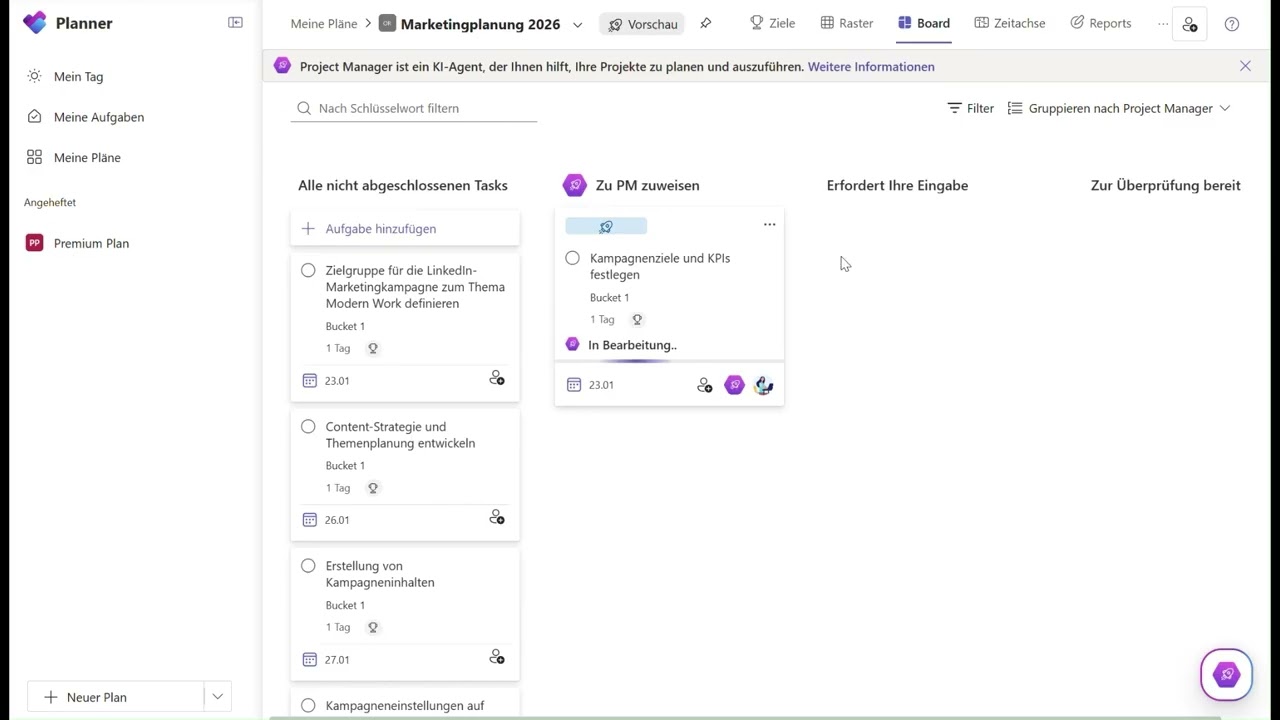
Copilot Project Manager Agent: More structure in demanding projects


M365 Copilot – Channel Agent (1)
In times of increasing project complexity with more stakeholders, shorter deadlines and rising requirements, structure and transparency become essential. The new Project Manager Agent takes over time consuming planning steps and helps move projects from idea to outcome faster.

What and How

Screenvideo Project Manager Agent

What can the Project Manager Agent do?

  • Loop components: Tasks can be embedded as Loop components, keeping results visible directly within the document. Team members can comment, provide feedback and use Regenerate to instantly start new iterations.
  • Agent follow‑up questions: If information is missing, the Project Manager Agent automatically asks follow‑up questions to ensure clear task definitions. This keeps the workflow consistent and reduces misunderstandings.
  • Whiteboard integration: A new Whiteboard tab in the Planner board lets teams capture ideas in real time. With one click, sticky notes can be converted directly into tasks.


How does it work?

The Project Manager Agent is an AI‑powered virtual project lead, integrated directly into Microsoft Planner. It automatically translates project goals into concrete, actionable tasks – and can even execute them independently when needed.
You simply define the goal, for example «marketing campaign by end of Q1.» The agent creates structured task packages including assignments and executions. Especially efficient: results are automatically stored as Loop components within each task, enabling teams to continue working in context at any time.


Important Notes

What should you pay attention to?

  • Language support: Initially available in English, with additional languages planned.
  • Requirements: Microsoft 365 Copilot license and support for Loop.
  • Whats next: Microsoft is planning further AI features such as Copilot in My Tasks for intelligent sorting and prioritisation, as well as automated status reports sent via email as weekly plan updates.

Benefits

Your everyday benefits

Relief: Fewer manual steps, as the agent takes over planning and execution.
Agile collaboration: Loop components and the Whiteboard foster team brainstorming and iteration.
Transparent control: Clear visibility through the agent view and task grouping by users.
Scalable automation: A multi‑agent architecture enables intelligent and error‑tested planning.

Conclusion


The Project Manager Agent in Planner is more than just a tool: it is a digital colleague that smartly automates project planning, supports iterative work and inspires teams. From goal‑setting to planning through to execution, Loop‑based feedback and a Whiteboard canvas turn it into your brainstorming partner.


You can find more tips and practical examples in the latest Spotlight video.

If you have any questions, we are happy to help.

Contact

Want to learn more about the Project Manager Agent?

Marie Terrana

Business Consultant
Bachelor International Business Administration

marie.terrana@isolutions.ch
Marie Terrana